
You’ve got to love ANY game that gets kids JUMPING for math! This game does just that! I got the idea from Kate’s blog. I am a floating teacher, so taping the answers on the board wasn’t practical for me. Instead, I created a Powerpoint presentation that can move from class to class with me.
How it works:
First, split the students into two teams and arm them with flyswatters. I taped a line on the floor that they had to stan
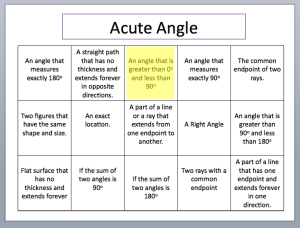
d behind. Then, I put up a powerpoint slide that contains definitions in boxes. A question pops up at the top of the slide and the first person to “swat” it wins! In the case of a tie, the swatter on the bottom wins! This game can move FAST, so I added a pop-up yellow box to indicate the answer after they swat. This way it is quick. They love seeing the yellow box pop-up! You could also put answers to questions in the boxes and put the question at the top. At the end, I did a “Speed Round” where the answers in the boxes were short so kids could read them quick. The Speed Round was a blast!
The file is a PPT template with instructions.
Or, you can just download the PPT file (not a template) with instructions.
Happy Swatting!
Update: If you want the actual Geometry Review Game – it’s here!
 I Speak Math