Mission #5: Twitter Chatter, Subject Matter

Mission #5 is LIVE!

I Speak Math's avatarExploring the MathTwitterBlogosphere

Hey all!  It’s Julie again!

I hope that you all are enjoying the challenges!  Remember, you can jump in anytime! This weeks mission involves Twitter so if you skipped “Mission #2, Twitter Me This“, you may want to revisit it for terrific tips on creating a Twitter account.

This week your mission is to attend a Twitter Chat!  Twitter Chats are one hour weekly chats held on Twitter. There are many different types of Twitter Chats, from general education chats to book chats. The twitter chats I love the most are the subject specific math chats just for math teachers! This week you are going to have the chance to specifically interact with teachers across the world that teach exactly the same subjects you teach! And there are math subject chats for everything from Middle School Math to Calculus and Statistics!

Browse the list below to see what day…

View original post 896 more words

Functions New-Tritional Lesson from Mathalicious

I have to give a shout out to Mathalicious lessons right now.  I’m impressed with the way the student sheets are structured.  The directions are very clear and accessible to students so they can get right to work without tons of questions or further explanation from me.  This allows me to walk around and observe so I can see where my students are and help the ones that are struggling.  The questions also progress in the lesson so that students use their previous work to make discoveries.  This is really tough to do when creating lessons.  Kudo guys!

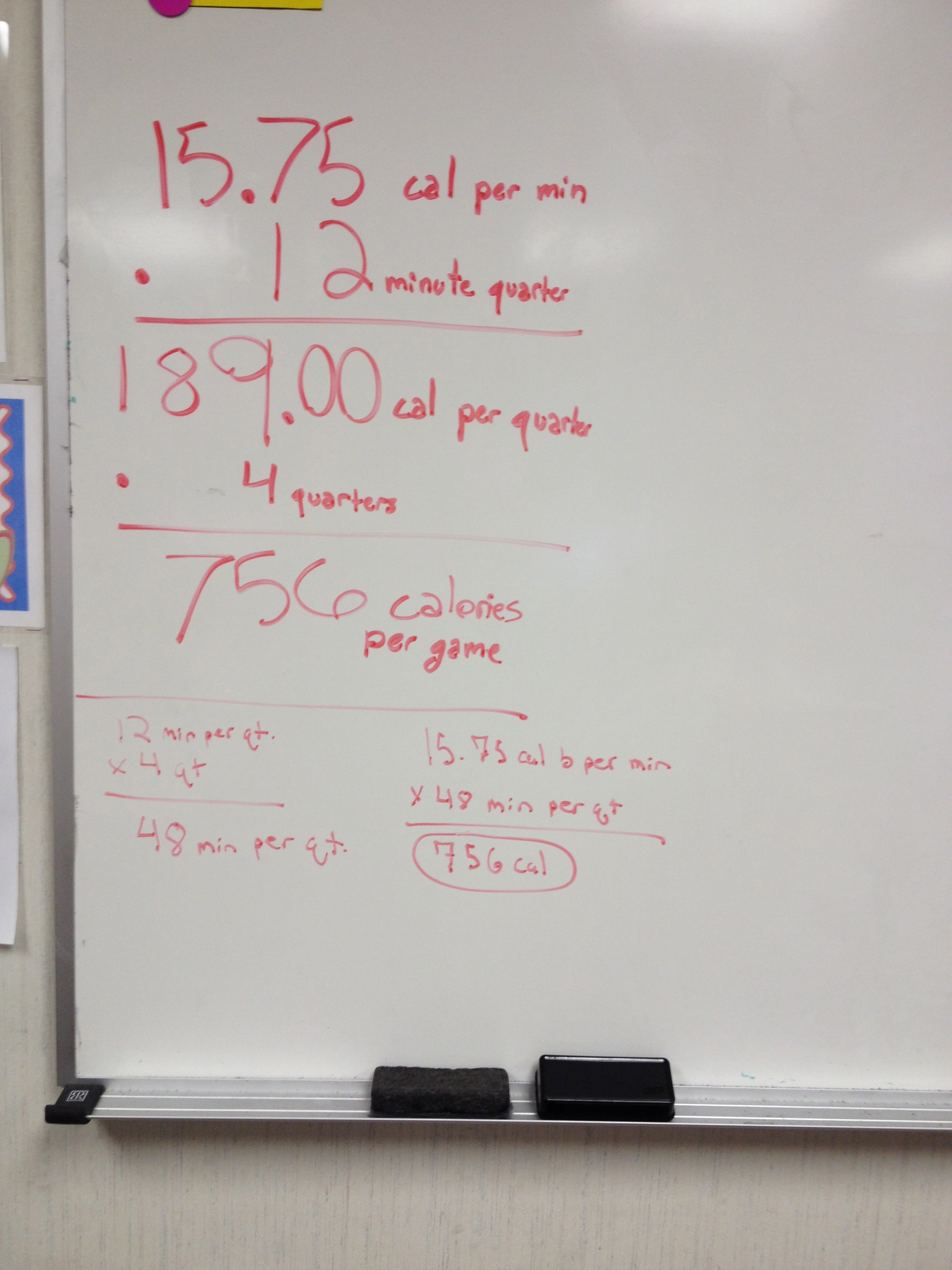
Screen Shot 2013-10-30 at 11.59.14 AMI did the Mathalicious lesson New-tritional with my 7th grade students.  I started with the opening slide and had them notice and wonder for a few minutes to see what they know.  They immediately got that it took 54 minutes of running to burn off the 550 calories in a Big Mac.  After watching the video, we talked about the preview questions (which I love btw)!  What factors affect how many calories we burn, how many calories do they think are in a big mac meal, and how long do they think LaBron would have to play to burn off that whole meal (if he had actually gotten to eat it)?

We then did Act 1.  I stressed UNITS!!  My lesson focus was functions, not decimals so I let them use calculators.  If I did this lesson in 6th, my focus would have been decimals and I would have them calculate it by hand.  Even with the calculator students said, “There has to be a quicker way to do this.”  FORESHADOWING!

IMG_6079A great discussion about the commutative property of multiplication came up in question 3 as students multiplied in different orders and got the same answer.  Then, I went back to their “easier way” remark and gave them two minutes on my timer to silently think of a better way to do all of this work.  After two minutes they shared their strategies with each other and then we discussed them.  I had listened in (Five Practices) and picked groups of students to go in order from least to most algebraic.  Rounding the cal/min was a suggestion by a couple of students.  But others pointed out that is wasn’t very accurate.  Several students wanted to graph it, and finally, a few even said that we could write a function.  Bingo.

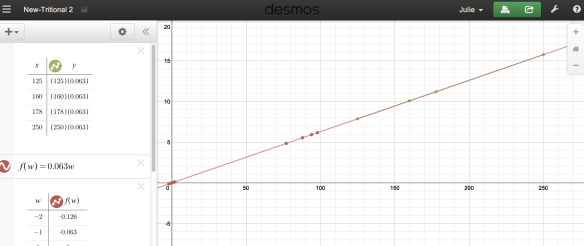
So, as they suggested, we started with a graph on Desmos.  We entered the weight, and then the cal/min of the activity.  In the 2nd class, instead of entering (125, 7.875) in the Desmos table,  125, (125)(0.063) so they could see the pattern without me having to re-write it on the board.  After entering in all of the basketball data, I connected the dots.  Of course they wanted to extend the line, but could not from just the table.  They knew they needed a function so I gave them two more minutes of silent time to just LOOK at the table and see if they discovered the pattern.  No lie, almost every student was able to write the function, for the win!
Screen Shot 2013-10-30 at 12.25.56 PM

When I typed the function in and the red line drew on top of our line segment there were gasps in the room.  Oh, how I love it when these magical moments happen in math class!  We then use the weights of student volunteers to see how many calories per minute they burned playing basketball.  We found it on the graph, but then I created a table from the function and they loved that even more!

IMG_6081The question “How many calories do you burn just sitting?” came up and another student exclaimed, “IT’S ON THE BACK!!”  A student commented that he didn’t even burn ONE calorie per minute by sitting!  Which made another student ask, “How much would you have to weigh to burn one calorie a minute sitting?”  I had them write the “sitting” function  f(w) = 0.009w.  Then, I wrote f(w)=1.  So that 1 = 0.009w and we just solved for w, then check the answer in our graph.  I love it when a week comes together this way!!

Bonus – Student Remarks:

  • That picture isn’t real food.  McDonalds has an artist make food sculptures that they photograph.  (Really? I had no idea)
  • Who is that old guy? (Larry Bird)
  • Oh yeah! I thought it was Clinton too! (After telling them of Elizabeth’s students.)
  • I bet LaBron burns more calories per minute than that playing basketball since this is an average.
  • How many calories do you burn sleeping (volleyball, jumping on the trampoline…)?
  • How many calories do you burn just sitting – OMG, It’s on the back!
  • How many calories do you burn thinking.
  • Thinking? That’s JUST sitting.

Thanks again Mathalicious for a great day!
Official Twittereen Entry Form!

The amazing and incredible Hedge created an official entry form if you want to participate in Twittereen.  We are really gettin’ fancy as the years progress here in the #MTBoS!

To see the official rules and enter in the fun, click here!

To read even MORE about Twittereen, visit Megan’s blog.

Yes, we are Twittereen crazy!

Let the games begin!!

Mission #4: Listen and Learn

Mission #4 is live! Come on and Explore the MathTwitterBlogosphere with us!

I Speak Math's avatarExploring the MathTwitterBlogosphere

Don’t worry if time has been your enemy and you have not been able to complete (or even participate in) the first three missions. Please jump in anytime!  The goal of the Explore the MathTwitterBlogosphere is to introduce teachers to everything this vast community has to offer. 

Hello all!  It’s Julie Reulbach, and I’m soexcited to share Mission #4 with you – Listen and Learn!

In the first few missions we connected through the written word via blogs and twitter. But for this mission, we are going to listen and learn, with a Global Math Department Webinar and an Infinite Tangents Podcast!

Below I’m going to explain what the Global Math Department and Infinite Tangents Podcast are all about. Then when you’re interested is piqued, I’ll introduce the actual mission at the bottom. And for a cherry on top, we have a bonus mission for you…if you choose to…

View original post 978 more words

#GlobalMath Autumn Special

Don’t miss the Global Math Autumn Special!

nik_d_maths's avatarMaths is Not a Spectator Sport

That’s right folks; you’ve heard about it on twitter; you’ve heard about it on the blogs; you’ve heard about it IN THE STAFFROOM (maybe). It’s finally here – the event of the quarter! It’s the:

GMD Autumn Special Poster

Come and join us on the 2nd November for the first of the Global Mathematics Department seasonal specials. This TWO HOUR basket of presentations, ideas sharing and collaboration is the first foray into making #GlobalMath happen at a time that is more convenient for folks across the globe, on a different Day.

The presenters we have on this time are a really special mix of teachers, curriculum specialists and department leaders; there should be something there for everyone from questioning, to lesson ideas, to ways to use software in new ways, to opportunities for recreational mathematics.

I’ll be hosting the event and it would be amazing to see as many folks as possible there to…

View original post 92 more words

HOWTO Participate in #Twittereen

It’s #Twittereen time! Thanks so much to Megan for blogging all about it! Head over to her blog to read how to participate and even how it all started (pictures included)! And don’t feel shy about participating, tweeps LOVE it when you dress up as their avatar. It’s so much fun! 🙂

Megan Hayes-Golding's avatarMegan Hayes-Golding

Screen Shot 2013-10-25 at 2.52.30 PM

#Twittereen is a virtual costume day for the mathtwitterblogosphere and beyond. The rules are simple:

  1. Change your avatar to “be” someone else for Halloween (that’s Thursday, Oct 31 in 2013).
  2. Tweet something about being in costume with the #Twittereen hashtag.
  3. Obsessively read Twitter all day long to see everyone’s costumes.

How did all this get started? I gotta be honest with ya, last year was my first year participating. I knew there was at least one before that. Thankfully, our #MTBoS-historian and Twitter Math Camp organizer, Lisa pinned down the origins for me: #Twittereen began in 2009, where it looks like Sean (@SweenWSweens) dressed as Sam (@samjshah).

Doing #Twittereen

How do you do #Twittereen? First of all, let’s bring Lisa (@lmhenry9) in to eliminate some stress:

Screen Shot 2013-10-25 at 12.14.50 PM

My approach is to first get inspired by browsing avatars of folks in the #MTBoS (or peripherally associated with us!). Then, I choose my…

View original post 738 more words

Mission #3: Collaboration Nation

Misson #3 is now live! Don’t worry if you did not do the first two missions, you can jump in at any time! It will be beneficial for you to blog about the missions, but we understand if you get crazy busy with school and run out of time. If this happens, please don’t quit all together! Just jump in when you can and participate as much as your schedule allows. The payoff will equal (if not be greater than) the time you spend. I promise! 🙂

Tina C.'s avatarExploring the MathTwitterBlogosphere

Tina here, excited to share this week’s new mission with you.

The awesome part about this community is all the sharing we do. Last week you experienced Twitter – that’s all about conversation. Twitter works for the short things we want to share – ideas, links, questions. The character limit is a bonus, it means no one is carrying on a monologue; Twitter is meant for dialogue.

Many times, those conversations leave you wanting more. You wish someone would elaborate on the thought they started in a tweet or share the entire lesson rather than a snippet. That’s where a blog comes in handy.

Sometimes, though, ideas are even bigger than a single person’s blog and turn into a theme that we compile or a new blog entirely (kind of like this one). This week is all about the things the MTBoS has accomplished when we join forces. These projects…

View original post 1,456 more words

How to Create a Math Class Wiki for Electronic Student Portfolios

After my post about Electronic Student Portfolios, I had many great questions in the comments asking for more details about how to start a wiki, or how I implement wiki’s in my classroom.  Wiki’s are great for classrooms because you can control who can edit, comment, and even view the pages.  You can make your classroom a private wiki that is only viewable by people that you invite.  My student’s pages are publicly viewable, but only members of my wiki can leave comments on the pages.

Screen Shot 2013-10-13 at 2.21.44 PM

To get started, you must first create your own wiki for your classroom.  I use pbworks for education.  I use the basic version, which is FREE!  They do have an option with additional features that costs $99 for a year.  But the free version has been enough for my classroom for the past four years, so it’s a great place to start.  Click here to sign up for your free classroom wiki from pbworks.

You will need to add each student in order for them to create their own page or even comment on the pages.  They will use their email address and create a password.  I wait to do this until I am ready for them to create their pages and they have all read my wiki guidelines, which I got from the amazing David Cox.  He’s way ahead of me with all things technology, so I just took a page from his book (thanks again David!).  To add your students to your class wiki you can invite them using their email or have them requests access.  Once added, they must be logged in with their email and password to edit or comment on the wiki.  They will lose this password, so I have them write the information on the cover of their math notebooks.

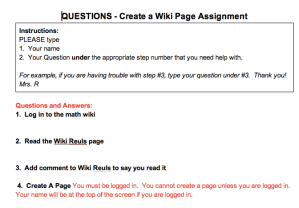
Creating their own wiki page is very fun for them to do, and I count it as a project grade.  I created instructions for my students to create their own wiki pages.  The instructions I give my students are step by step and I expect them to read and follow the directions carefully.  This can be challenging for middle school students at times.  To help them find the answers to their many questions when they are creating their wiki pages, I created a Google Drive Question Documents.

Screen Shot 2013-10-13 at 2.28.35 PMInstead of raising their hand and not working while they wait for me to get around to them, I have them type their question into this Question Document, under the step number that they have the question on.  This is important because this makes them read the question again.  I reply by typing onto the document.  Almost all of their questions are answered in the instructions so I usually instruct them to go back and carefully re-read the directions.

If you have never used a wiki before, I do not have a webinar or detailed instructions on how to use PBWorks.  I just learned through experimentation and trial and error.  However, I did find a free online tutorial made just for teachers that explains wikis using pbworks, so if you need more instructions, you could go there.  I haven’t watched all of it but it seems very thorough!  If you find a better instructional website, please feel free to add it to the comments.

Electronic Student Portfolios in Math Class

Explore the MTBoS – Mission #1 is in full swing now!  We have had over 150 bloggers post this week!  If you haven’t written your post yet, there is still time.  One of the blog topics this week is about “rich tasks”.  I am trying to incorporate more rich tasks into my classroom, so thank you to all of the great bloggers who posted about their rich tasks because this is very helpful to me!  If you haven’t been over there to read the blogs, you should go and read some now!

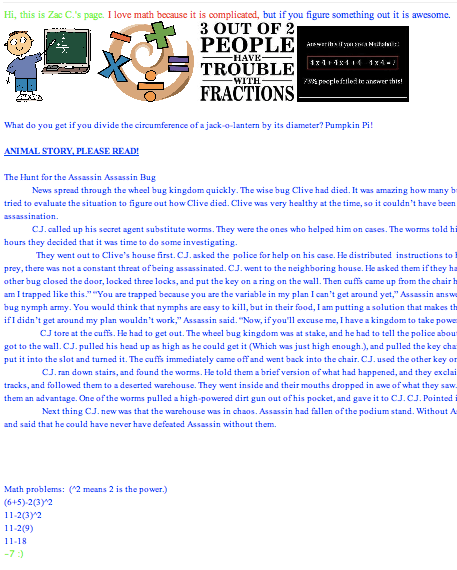
For this weeks mission, I decided to blog about something that makes my classroom distinctly mine.  One of the best things that I have my students do every year is to create their own math wiki page.  Each students wiki page is an electronic portfolio of their math projects and a place for them to showcase anything math related that they find.  Many students add funny math jokes and pictures to their pages.  Some students also put on math quizzes and extra hard problems that they create for other students to solve.  For many of them, it is their first exposure to “social media”.  They love reading and commenting on other students pages.  I give them class time to read other students pages, but they also read each others pages on the weekends and even over breaks.  They love being able to create their own page, and I love that they are spending so much time exploring more “mathy” things.  It is especially a big hit in 6th grade, when students are new to computers and technology and aren’t heavily into other social media sites yet.

My new students know about the math wiki pages from my older students and usually start asking when they will get to create their own math wiki page on the first day of school.  I love that there is such a positive buzz about it.  It’s great when students are really looking forward to an activity in math class.  This week my new 6th graders will finally get to create their pages!  We are all pretty excited and I can’t wait to see what my new student produce!

Check out some of the wiki pages my students have created in the past.

Math Wiki Pages

7th Graders and My Monster Hat

Monster hat for monster equations!

I Speak Math's avatarone good thing

7th graders are hard for me to teach.  For me it is tough because I had them when they were in 6th grade.  They were new to me and to middle school.  They were bursting with excitement every day.  Most of them have never had a singing, monster costume wearing teacher and they enjoyed it.  In 7th grade, it is my 2nd year with them.  They have had me for an ENTIRE year, they have heard all of my stories, they know my jokes.  The shine is worn off.  So, I think I am probably “old hat” or boring to them on most days.  Of course I wish they were loving every minute of it, but I’m ok with this as long as they are learning.   This is my 4th year teaching 7th graders, I now know not to take it personally.  But, sometimes I do.  And sometimes this loss…

View original post 76 more words