PBS Innovation Fund Challenge – Tonight at Global Math, 9PM EST

PBS is working to increase their middle school math resource collection in order to help middle school math teachers across the nation.  They are looking for innovative digital education material that is connected to the real world and are even offering $1,000 prizes for the best submissions.  My favorite part?  NO TALKING HEADS.  You can read the summary below and then go to their website for more details.  I needed more explanation after reading the summary and talking to Erica Rabner (of PBS) really helped clear it up.  Tonight, Erica will be at Global Math to further explain this challenge and take any questions.  They are working on improving the summary (below) so it’s more easily understandable.  So, read up, develop your questions, and we’ll see you there!

From the PBS Innovation Fund Challenge Page:

The Innovation Fund is a challenge for educators, student teams, gamers, programmers, and anyone who has a great idea to create fun and engaging math educational media.

WGBH Educational Foundation is seeking up to 100 educational media digital resources (videos, games, interactives, infographics, and manipulatives) that are directed towards middle school students and loosely aligned with the Common Core State Standards for Mathematics. The digital resources selected will be showcased on PBS LearningMedia as part of a middle school math resource collection.

WGBH is looking for content that engages a wide range of students by reflecting a wide range of culturally responsive perspectives and learning styles.

Digital resources should be engaging, rich in content and context, and go beyond strictly procedural teaching. In other words, no talking heads.

TURBO – Fun Conversion / Percent Problem

We just went and saw the movie Turbo.  Thank goodness for the math going on in my brain, otherwise I don’t think that I could sit through ONE MORE animated movie.  Anyway, at the beginning of the movie, it takes the little snail, Turbo, 17 minutes to go 36 inches.  At the end of the movie, he is moving at 226 mph.  I have the beginning video to show my students, but I can’t find a clip where Turbo goes around the track and lights up the 226 mph.  I’ll probably have to wait until the movie comes out on DVD, but that’s ok as we don’t do conversions for a while.  I wanted to go ahead and blog about this now though so I don’t forget!  Kids love when I bring movie clips into class, so I think they will have fun with this.

The Plan:

    • Show the 36″ in 17 minutes video clip.  The first 30 seconds.
  • Show the 226 video clip (once I find it).
  • Ask them what they notice and wonder using Max’s awesome Notice/Wonder form!
  • Discuss their noticing and wonderings, then formulate what we want to know.
  • Get down to the math in groups.  I’ll let them work on their own silently for a few minutes, then have them get together to discuss and help each other. (Thanks Fawn)
  • I may even play “That Snail is Fast”, just because.

The Math

  1. I would like for them to investigate how many miles per hour the 36″/17 minutes equates to.
  2. How much faster is the snail going (percent increase).  My student often have trouble doing percent increase when it is such a large percent.  This will be great!
  3. Anything else they come up with.
  4. I’m curious is 36″/17 min is how fast a snail actually goes.  I bet googling that will lead us to more conversion problems.
  5. I’m still working on follow-up / extension ideas.  So if you have any, throw them in the comments!

“Infusing Math Class with Google Docs” Slideshow

It’s always great fun presenting at Global Math!  If you want to actually hear the entire presentation (and all of the great questions that went with it), go to Global Math.

If you would like anything else, please let me know in the comments.

This presentation contains many examples of my Google documents as well as student work.

I explained how to use the different Google Document software platforms for project work and collaboration in the mathematics classroom.  I shared technology based projects that encourage students to be creative and allow students to differentiate their own learning.  I showed how you can use these student generated projects as curriculum (and even homework) for future students.

Finally, I talked about formulas and the amazing ImportRange function that allows you to import data from many spreadsheets into one!   This is great for organizing Concept scores.

I’m Presenting Online at Global Math, Infusing Math Class with Google Documents, this Tuesday!

Come and see how Google Documents can transform your mathematics class and inspire your students!  This Tuesday at 9PM EST I’ve got the entire hour to teach you all about how I use Google Documents almost every day in my math classroom.  Click here to pre-register or just show up on Tuesday night at 9pm and enter the conference.  I love the Global Math format as everyone can “chat” and ask questions while I am presenting.

This session is for teachers that are new to Google Documents as well as experienced users.  I will be showcasing many examples of my Google documents as well as student work.

I will explain how to use the different Google Document software platforms for project work and collaboration in the mathematics classroom.  I will share my technology based projects that encourage students to be creative and allow students to differentiate their own learning.  I will also show how you can use these student generated projects as curriculum (and even homework) for future students.

Screen Shot 2013-03-18 at 12.28.57 AM

Homework Choice Allows Differentiation and Encourages Creativity

Listen to me present this live at Global Math (recording will be up 2/6/13).

I have recently started offering “choice” homework assignments – and my students LOVE them.  Last week in a survey, many of them said that they loved working on the choice assignments and requested to do more of them.

IMG_4692

For the choice assignment, students can do traditional homework (workbook problems only) OR they can do half of the workbook problems and then create their own word problem (with solution) based on that concept.  They can write their problem on paper or create a Google Document and share it with me.

The next day, I have the students work each other’s problems in class.  The students like to share their fun problem.  Plus, they help each other solve their problems when they get stuck or have a question.  It is also great because sometimes they find mistakes in a problem and will help that person understand what they did wrong.  They love working each other problems and teaching (and helping) each other.  I walk around the room looking at their problems and helping as needed.

Choice assignments are automatically differentiated.  Students having trouble with a concept often chose to do the workbook problems so they can check their answers.  Most students who make up problems create ones that are similar to ones that we have done in class.  However, some students make up more difficult problems or go above and beyond with their creativity.

IMG_4702 IMG_4701 IMG_4722

They are having so much fun making up their own math word problems – and spending so much more time thinking about math.  Students usually dread working word problems but when they are creating their own and solving their friends problems they love them!  I love how excited they are about their math homework and that they have asked me if they can do more choice assignments in the future.  Another benefit for me is that I can use their problems in the future for subsequent classes.  My students are creating creative and engaging word problems for future students!

Here are some examples of the work they have created.

Student Thoughts about the Khan Academy

I went to a “Technology Meets the Brain” conference on Wednesday.  It was a full house of energized teachers who love technology and are striving to make their teaching better through research by attending a conference.  Two teachers next to me started grumbling when the Khan Academy was mentioned.  Upon saying, “Not a big fan of the Khan Academy?”, the teacher next to me opened up.  Their two middle school aged children were required to do Khan Academy at their school.  When I asked them if their children liked it, “NO!” was their emphatic answer.  They told me that their children were not only required to become proficient in EVERY topic, but they also had to watch all the videos.  The Khan Academy software can track if the students watch the videos, so their children now hit the play button and then go and do other homework, then come back to work on the problem sets.  But the worst part, they told me, were the problem sets.  Some problem sets take a very long time to become proficient in.  And, if you accidentally type in something wrong you have to do many more problems.  Their children have been doing this since August, and they are sick of it.  They said that they and their children hated the Khan Academy.  Both of these friendly, engaging women are teachers.  And both of them are working to change things for their children.  They want their children to love math, especially in middle school where they know many students are lose interest in math forever.

They were looking for research to enlighten their children’s teachers.  When I started telling them about some of the criticism I had heard, they asked for links and sent me their email.  I emailed them links to some of these criticisms, which included:

I rarely use the Khan Academy, and only as a tool.  I do not use it to “flip” my class and I never assign the videos.  There are much better videos out there if you are willing to spend the time looking for them.  Like any other homework I assign, I only to ask them work for a maximum of 20 minutes.  Mostly, I have students use it for remediation and extra help or extra practice if they want it.

I should love the Khan Academy problem sets because kids get immediate feedback and I get tons of data.  But I don’t love it, so I don’t use it very often.  And after one really bad Khan experience, I do not require my students to become proficient in any topic.  Just like Fawn, my students really hate the fraction sets (and a few others), but they seem to like the new “Intuition Sets” (thanks to all the MTT2K’s for bringing this about).  I also dislike that I don’t have a place on their site where I keep the sets I want to use for easy assignment.

I was very surprised by my encounter with the two teachers and their strong reactions, especially since their children were such frequent users.  So, I decided to survey my students about their thoughts on Khan.  Since I am pretty ambivalent about it, I expect them to feel the same way.  I was surprised at the results.  Overall 6th graders ranged between liking and loving it, while 7th graders ranged from not liking it to hating it.  All of my students become frustrated when it takes “forever” to become proficient in a topic on Khan, especially if it is due to their frequent typing errors during solution entry.  “I had a negative on my paper but didn’t type it in!” or “I hit enter too soon!”  And even students that like the problems sets rarely watch the videos.  When asked how often they watched the videos, 75% of my students said rarely or never, 25% said occasionally and none of my students said often.

6th Grade Results

My 6th graders are first time computer owners, so they love anything technology.  As I very infrequently assign Khan sets, and never require proficiency, they have not really had a bad experience with it (where they were required to become proficient for class and it took them hours).  When I surveyed them about Khan I was surprised to see that several of them actually love it.  They said that it was fun and love earning points, even doing simple addition and multiplication sets just to earn extra points.

7th Grade Results

On the other hand, with the exception of only one student, most of my 7th graders HATE it.  I was actually quite surprised at this result as well.  I had never asked them if they liked it or not, and was not aware they felt so strongly against it.  I’m not sure what the big difference is between 6th and 7th grade.  ONCE I required that the 7th graders become proficient in one fraction topic.  They had a terrible time with it.  As soon as some of them told me how much they had been working on one set I told them that they did not have to become proficient.  Maybe this experience is what did them in.  I plan to look into this further with them.

What my students said they like about the Khan Academy:

  • “It’s a fun, new way of learning.”
  • “I like that it helps you through the steps”
  • “its fun and you do it for points too, not just work”
  • “Good practice”
  • “i like it because you can practice without worksheets.”
  • “I like how it helps with math.”
  • “It inspires me!”
  • “I like that it gives you points that you have to work up to”
  • “we can earn badges and unlock new characters”

What my students said they do not like about the Khan Academy

  • “It’s boring.” (70% of 7th graders said this).
  • “I don’t like how you have to do several more sets if you miss one problem by a careless mistake.”
  • “I do not like how if you get one problem wrong to are not in the blue section.”
  • “Because if i do not understand something I need 1 on 1 help not a computer.”
  • “It is hard to figure out equation bars, like the fraction, and if you do not do the right bar you get it wrong when the answer is right.”
  • “They do work a little different than we do in class.”
  • “They are worded weirdly.”
  • “More work less game.”
  • “I don’t like how it will just give you the answers.”
  • “the *help me* button is usually a different method than what we learn”
  • “When you mess up barely on one problem you have to do a whole other set”
  • “If you don’t have a link, it can sometimes be hard to find the problem sets and then you are looking at videos instead of problem sets.”
  • “It is confusing”
  • “Hard to use”

I recently stumbled upon the Khan sets for graphing systems of equations with slider bars that I would like to try out with my 7th grade.  It seems to be a fast, neat way to check your graphs of linear equations and see if you are getting the correct answer.  But only time will tell if it is a success, as my 7th grade students are Khan’s toughest critics.

The software I am dying to try out with my students is Ten Marks.  I just haven’t had the time to get organized.

Do you use Khan Academy with your students?  If so, how do you use it and do they like it?

 

“Flipping” the Math Classroom

Click here to submit your MS Sunday Funday post!

 #msSunFun“Flipping” a classroom is usually thought of as having students watch video lessons at home, and then coming to class the next day prepared to work on problems during class time.  This week middle school teachers are blogging about their experiences with flipping the math classroom, even if they have only flipped one lesson.  I am excited to see the different ways teachers are improving on this model, as I haven’t had much success with all students in my classroom when they watch a video at home.

Next week, we will blog about student reflection and goal setting.  This can be academic, or character building.  To suggest a topic, fill out the survey below.

Infusing Middle School Mathematics with Technology

Welcome to my presentation!  Please click here to take a survey.  Next, we will work collaboratively on a Google Document with other teachers.

My presentation focuses on how I use Google Documents in the classroom.  I created a Powerpoint for my presentation, and in lieu of handouts, I created a LiveBinder for the participants (below).  The LiveBinder contains the information from my presentation, as well as links to the complete Google Document files I referenced in my presentation.

I hope that you find this LiveBinder informative and helpful.  Please do not hesitate to put any questions you may have in the comments section.

Thank you!
Julie Reulbach

I am presenting at the NCAIS Biennial Teacher Conference on Friday, November 2nd, 2012.  NCAIS is the North Carolina Association of Independent Schools.

Google Docs for Project Questions = BRILLIANT!

I teach 6th graders.  I’ve learned that they struggle with following directions (written and verbal) and really good at asking millions of questions (you know, when they don’t listen or feel like reading the directions).

This SHOULDN’T drive me crazy, because I know it is a skill they are still learning.  I know that many of them have been spoon fed each and every step, one step at a time, in elementary school.  I know they are sometimes just too excited to listen to me, or read the directions.  But, they have to now.  Because otherwise I NEVER get to everyone’s questions.  And they just sit there, with their hand raised, waiting on me to help them, while they do nothing, but wait.  The result is usually that several students do not finish their daily project, and I get really frustrated answer almost the same question 50 times, an hour.  “Did you read step #3?”  “That is written in step #2.”  “You can find that answer in step #5 of your written directions.”   “Have you read the directions?”

Enter Google Documents.  God bless Google Document today.  Today I SAT, in one spot, in my comfy teacher chair, and answered questions.  In fact, I was able to answer over 50 detailed questions in just two 45 minute class periods.  Since this included introducing the project and a summary at the end even I can’t believe how many questions I answered (painlessly).  Everyone got so much work done.  Many students even finished in class.  The classroom was very quiet today while the students actually read and followed the directions.  It was teacher heaven!

Ok, I KNOW – enough already.  I will get to what I did.  I am just in awe and basking in it tonight!  This is the third year in a row I have done this project, and this is the first year is wasn’t pure torture for me.  In fact, it was a blast!

  1. I created the step by step project instructions, as usual, and made them available to the students. 
  2. I created a public Google Document and I retyped all of the project steps onto it.
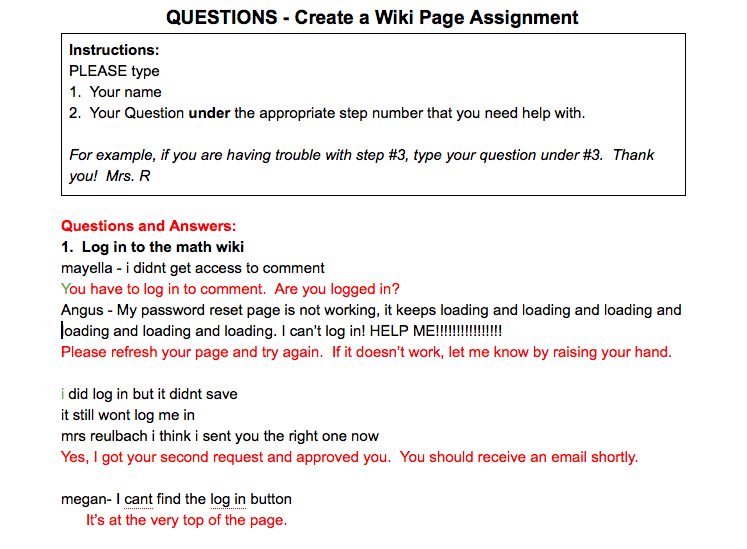
  3. I told the students how to use the question document.  The students were instructed to type their question under the step that they had a question on.  This was great because they really had to pay attention to which step they were on.  This often meant re-reading the question, and many students discovered the answers to their questions by simply re-reading the instructions.
  4. Every time I saw a hand go up in class I asked the student if they had already typed their question on the Google Doc.   I also asked them if they read the other questions that had been posted on that step.  Often, their question had been asked and answered by another student and was already on the document.

In the end, it looked like this…

MS Sunday Funday – iPad Apps and Other Technology in the Mathematics Classroom

 #msSunFun

Next week, please blog about how to increase students problem solving skills.