Video Tutorial Project – A Student Favorite

Lights, camera, action!

Screen Shot 2014-01-13 at 9.11.50 PM

Every now and then I have my students watch an explanation (teaching) video online.  I sometimes do this as a review when I’m beginning a topic that they have studied before.  They always hate it.  They always complain.  So, I rarely assign them teaching videos to watch.  They really hated the last one I assigned.  Their complaining gave me the idea to have THEM make their own teaching videos – and to do it better!

The Video Tutorial Project took a week of class time (and that included watching everyone’s videos one day in class).  However, I did not give them a review day or a test for this unit, so it was only about 3 extra days.  In their written reflections, it was clear that my students LOVED this project.  And, their videos were impressive.  They were creative in their presentations and even added transitions, music, and even special effects.  My favorite video was a take off of Vi Hart’s videos.  There is no way I could have made a video this good, ever!

Screen Shot 2014-01-13 at 9.10.03 PM

I partnered the students into groups of 2, and let them pick their topic from our current unit.  They had to state and define their topic, then show three clearly worked out examples, increasing in level of difficulty with each example.  They could make the video anyway they wanted.  They all had to upload their video to YouTube.

I created a project planning Google document for them to follow, and distributed it using Doctopus.  I had them create the three examples problems for homework one evening and submit them on a GDoc form.  That way, I could check to make sure their examples were sufficient.  In class the next day, they made any necessary corrections and planned their video.  They had the next three days to record and edit their video (if they chose to edit it).  I gave no other homework this week so that students would have time to work at home on it if needed.

Watch all of their Video Tutorials Here

This project was worth the time invested and I will definitely do it again.  The students loved it (see their responses below).  We had a few challenges that I would like to address before assigning this again.  One was finding quiet places to record on campus (it was freezing that week so it was not very comfortable outside).  Another challenge was the partner issue.  Students could only work together at school because this was a partner project.  Also, the video editing (if they use iMovie) always falls on the shoulders of one of the partners, which I don’t like.  I have thought about having each student make their own video tutorial, but they have so much more fun working together.  Also, in their reflections all of my students but TWO would rather work with a partner.  They also would have liked more time, but they always tell me that.  They would work on a project for a month if I let them.  They are awesome.

Student Thoughts:  What did you like the BEST about the project?

  • I felt like it really helped me even because watching the video helped understand the concept better.
  • How we could add our own interesting twist.
  • The part about how you could add in a challenge problem.
  • I loved how you can create a tutorial in so many ways, like white board or like V Hart.
  • working with a partner how creative we got to be
  • THE FREEDOM
  • it was fun
  • All of it!!!
  • having fun with my friend
  • Recording 😀
  • The fact that we could put what we wanted into the video
  • Getting to use my tablet to draw math.
  • We had alot of freedom to make it however we wanted and everyone had a different video.
  • I thought it was very creative.
  • filming
  • working with partner
  • that we got to make a video
  • Working on whiteboards and working
  • partner work
  • Probably putting it all together
  • That is wasn’t just an ordinary project.
  • The filming part.
  • the creative freedom was fun
  • the filming
  • The recording
  • It was awesome to just be able to go out on our own and make our own tutorial.


Proportional Reasoning – Capture Recapture with Goldfish

IMG_6411You know a lesson is awesome when the Goldfish that the kids get to eat aren’t even their favorite part of the lesson!  I had done the Capture Recapture lesson a few years ago and it didn’t go very well, so I abandoned it.  However, after seeing a video about the concept (thanks to Alisan’s presentation at NCCTM), I decided to revisit it.

I introduced the concept with a question from NRich, then we watched this video on YouTube.  It is imperative that you show your students the video.  If a picture is worth a 1,000 words, a good video can be worth 1,000 explanations.  The video starts with ping pong balls, then moves on to black cabs.  I only showed my student the ping pong portion with my students, and then stopped it before he showed the math.  I had them calculate the estimated number of balls, and then showed them the result.  They were hooked!

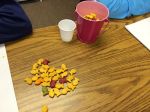
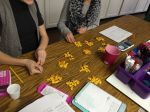
We moved on to Goldfish.  I gave each pair of two their own “pond” full of about 150 yellow Goldfish crackers in a container.  I also gave them a small sample of colored Goldfish in a dixie cup.  I first had them estimate the number of fish in their pond.  I would not let them dump the fish out  for the estimation as biologist do not dump the fish out of the pond.  We then counted the colored fish (our tagged sample) and replaced Goldfish with the tagged colored Goldfish.  I let them eat the fish they replaced.  After mixing the tagged fish into their pond, they took a sample and calculated the proportion.  To have accurate results, we repeated this 4 total times and then took an average.  After they calculated their average, they counted their fish and we compared results.  This was the best part!  They were shocked to see how close their calculated proportions were to the actual number!  Most groups were only off the actual count by 10 or less Goldfish!  I even  had groups come within 1, 2,  and 3 of the actual number of fish in their pond!

Procedure:

  1. Estimate number of Goldfish in pond and record.
  2. Count the number of tagged fish, record.
  3. Replace Goldfish with tagged fish.
  4. Mix tagged fish into pond.
  5. Take a new sample.  Count total sample and tagged fish, record.
  6. Calculate proportion to find estimated number of fish in pond.
  7. Repeat this three more times.
  8. Find an average.
  9. Count actual fish in the pond and compare.

Files:

  1. Pdf – Capture Recapture Data Sheet
  2. Powerpoint – Goldfish Proportions Capture Recapture
  3. Slideshare File (same as ppt, but in slideshare)

Goldfish Capture Recapture Worksheet

2013 in Review

I love ending the year with reflection.  Each year WordPress sends me a summary that I enjoy reading.  This year, thanks to Sheri, I also made a video that summarized my twitter year in a fun way.  This video led to my top 10 tweets.  I enjoy looking back and seeing what the year was like in review.

Twitter Video Summary 2013

The WordPress.com stats helper monkeys prepared a 2013 annual report for this blog.

Here’s an excerpt:

The Louvre Museum has 8.5 million visitors per year. This blog was viewed about 370,000 times in 2013. If it were an exhibit at the Louvre Museum, it would take about 16 days for that many people to see it.

Click here to see the complete report.

My Top Tweets of 2013

Our Code.Org Coding Success – A Summary

Screen Shot 2013-12-17 at 12.43.19 PMLast week my students participated in the Hour of Code.  It was an overwhelming success!  They enjoyed it so much that they continue to code, and they continue to ask me everyday if we are going to code in class.  As soon as they have any extra work time in my class, they are coding!  With these amazing results, I am looking to the future.  I would love to plan lessons and projects with coding involved.  I only hope I have the time to prepare this for my students.  They deserve it.

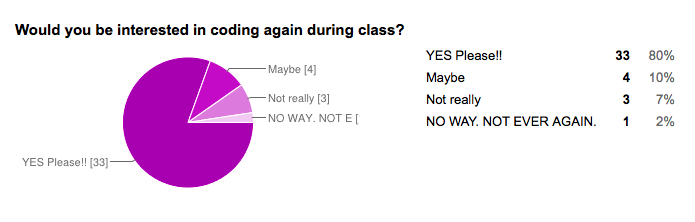
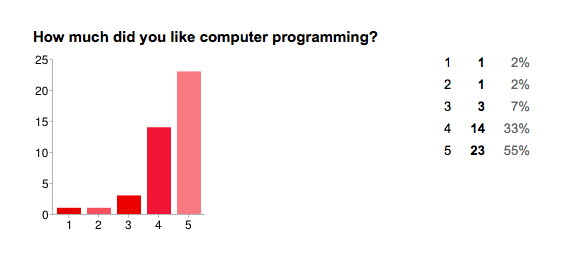
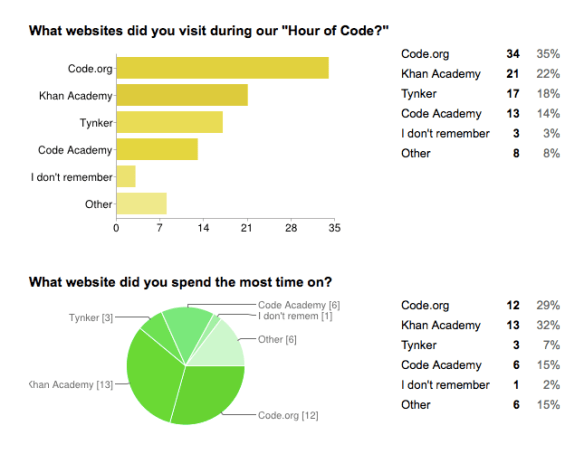
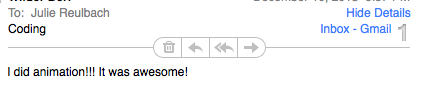
After our Hour of Code, I surveyed my students to see if they liked coding (on a scale from 1 – 5), and if they would like to continue coding in class.  The results are below.  I have included some excerpts and  you can also read their responses in detail here.  They were emailing me their creations, so I created a “Coding Creations” wiki page where they could add things they have created (or continue to create).

Screen Shot 2013-12-17 at 12.31.13 PM Screen Shot 2013-12-17 at 12.30.54 PMScreen Shot 2013-12-17 at 12.31.04 PM

Quotes from students:

It was really fun to just type in all the stuff and have no clue how it was going to turn out. It was also really fun when I got home and had to figure out what was wrong in all the billion lines of code I had typed in class. After hours of work all I had needed to do was take out the commas in the character’s speech. Thanks to the Hour of Code I am ready to go back and add in more complicated things to my campaign. Computer programming is really fun, and I can’t wait to do some more.

It was interesting and pushed my mind further and gave a sense of power in my mind and keyboard

I love coding so much! I think it is so fun to watch the videos and learn how to code! I woke up at 4:30 two mornings ago to code, and at 5 the day before. I am obsessed.

I thought it was really cool how you type in numbers and words, and it is linked to a little picture. I loved how you could make the holiday cards on khan academy! It was so fun! I also loved how it seemed really hard at first, but after you got the hang of it, and memorized the basic codes, you could create complex pictures.

I think it is really fun to look at all the things we use computer programing for and how important it really is in modern society and then be able to learn to do it! Its AMAZING!

I loved computer programming because you got a head start for the future. This has made me want to do more computer programming in the future!

I did 5 because coding is fun and interactive. It may seem scary but there is a world of computer science out there and coding is one major part.

I LOVE TO CODE!!!! DO MORE!!

I also asked them, “What did you like best about coding?”.

I liked best about coding that I could just type some letters and numbers and make what I imagined come to life! It truly is amazing.

It was very cool how you really got to control your computer and that you could build anything you wanted to.

I liked that it really made you think.

What was so cool was that after you got the hang of it you were basically doing it by yourself, at your own speed, and what every you wanted to draw.

It let your creativity flow, you could make anything you wanted with no strict deadlines.

I like coding because it lets you express your self in a more complex way.

The multitudes of possibilities and how simple it really is.

The fact that i could create those things on a computer just by typing in stuff!

The challenge and the good feeling when your character does exactly what you planed for it to do.

Hour of Code = Amazing Success

I cannot say enough good things about the “Hour of Code” that my students participated in today.  When I showed them the intro film yesterday they were so excited about coding they begged for the website link.  I gave them code.org/learn.  Another teacher told me that they started working on it immediately in work time yesterday.  Multiple students told me they went home and worked on it last night, some for a couple of hours.

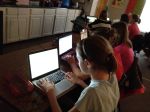
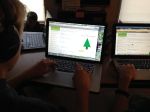
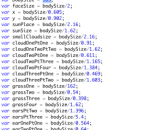
Today, they ran into my room before class even began and asked if they could start.  I was overwhelmed with their excitement and curiosity in coding.  They started with the code.org/learn tutorials but many of my students quickly moved on.  Some of them ended up on Tynker or Code Academy, but the majority landed on Khan Academy and learned to write Javascript on their own.  It was easy for me as all of the websites have video tutorials.  Students were working together and asking each other for help if they had questions or when they got stuck.  At one point, I had half of the classroom around one students computer until he told them to “go and sit down so he could think!”  I took some pictures and videos to share (see below).  If you watch the video clips, be sure to listen to all of the students brainstorming about their programming in the background.  I just noticed that when I watched the video again.  There definitely was a “electric math/computer” buzz from all of my students in the background!  Videos on YouTube!

I signed up on the code.org website but did not receive an email with instructions or a teacher code.  I later saw that I could have the students enter my email address on their code.org page, but by that time they were very involved and I didn’t want to interrupt them to have them put my email in.  Even though I would love to get a summary of what they accomplished it was not worth stopping them.  The whole point of the day was to get all of my students coding.  The mission was accomplished, as I’ve had several students email me the progress they have made tonight with the projects they are still working on!

Screen Shot 2013-12-10 at 10.26.53 PM

Screen Shot 2013-12-10 at 10.28.19 PM

I’m not sure how long these tutorials will be available, but I do intend to find a way to give students class time to learn coding in the future.  We have been inspired and I want to give them the opportunity to develop this skill and keep this excitement alive!

Videos on YouTube!

Participate in the “Hour of Code” for Computer Science Education Week

Screen Shot 2013-12-09 at 10.30.18 PM

I’m so excited about the “Hour of Code”.  And, after showing my students some of the promo videos today, they were excited too!  So excited that they begged me for the link so that they could start tonight.  Visit csedweek.org for all of the details!

The goal is to have 10 million students participate in coding this week.  Here is why you should do it with your students.

  1. It’s free.
  2. It’s easy (minimal teacher prep).  Code.org provides many self-guided online student tutorials for ages K-12.
  3. Kids LOVE it. I introduced it by showing my students the promo videos. My 7th grade students got so excited!  There are 1 minute5 minute, and 9 minute versions.
  4. You can use computers and other devices.  They also have suggestions for classes with only a few computers.  If you do not have computer access, they even have off-line activities.
  5. It’s great for their BRAINS.

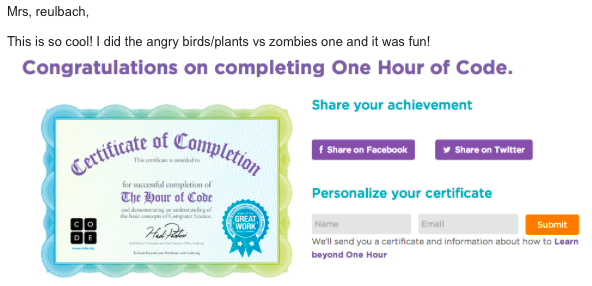
After I gave them the link, students were already working on it today in their free time and at home tonight.  One student emailed me her certificate of participation after completing the first tutorial!

“This is so cool!  I did the angry birds/plants vs zombies and it was fun!”

Screen Shot 2013-12-09 at 10.23.32 PM

Here is an “Hour of Code” Walkthrough video for teachers.  I watched this first.  I am doing our hour tomorrow in class and will let you know if I have any tips.

Hour of Code Handout for Schools

Also, these stats will convince you!

Nix the Tricks: A Must Read FREE eBook for Teachers, Tutors, and Parents

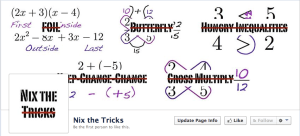
We have all heard them (and maybe even taught or still teach them).  From “hungry” inequalities to FOIL, this eBook talks about the shortcuts that math students use, why they hinder conceptual understand, and even offers advice on alternative teaching methods.  Each section focuses not only on a “trick” that could be “nixed”, but a fix as well!  Student examples are included.

Nix the Tricks covers everything from 2nd grade to high school math and should be read by every teacher, tutor or parent that teaches math.  

Screen Shot 2013-12-08 at 5.05.43 PM

For over a year, math teachers in the online mathematics community (known as the #MTBoS) have been contributing the tricks that frustrate them the most.  Tina Cardone compiled all of these tricks and put this amazing resource together!  The best part of this entire concept is that it is still being updated and edited!  As always within the open source #MTBoS, you are invited to join in on the conversation to discuss the tricks and even submit the tricks that frustrate you the most.

Screen Shot 2013-12-08 at 5.20.05 PM

Tina is also working on a printed version of the book that can be ordered online.  Download the eBook and like the Facebook page for updates on the printed version and new revisions.

Screen Shot 2013-12-08 at 5.24.42 PM


Mission #8: Sharing is Caring in the MTBoS

It’s the LAST MISSION! Go out with a bang! Even if you haven’t had the time to do even ONE mission – you should just go for it and complete this last mission! Or, at least fill out the survey! Thanks so much!

samjshah's avatarExploring the MathTwitterBlogosphere

It’s amazing. You’re amazing. You joined in the Explore the MathTwitterBlogosphere set of missions, and you’ve made it to the eighth week. It’s Sam Shah here, and whether you only did one or two missions, or you were able to carve out the time and energy to do all seven so far, I am proud of you.

I’ve seen so many of you find things you didn’t know were out there, and you tried them out. Not all of them worked for you. Maybe the twitter chats fell flat, or maybe the whole twitter thing wasn’t your thang. But I think I can be pretty confident in saying that you very likely found at least one thing that you found useful, interesting, and usable.

With that in mind, we have our last mission, and it is (in my opinion) the best mission. Why? Because you get to do something…

View original post 501 more words

Math Games Collection on Google Docs – Add Your Game Today!

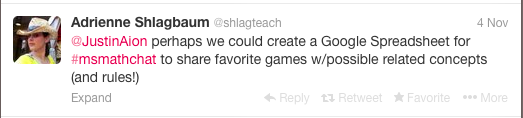
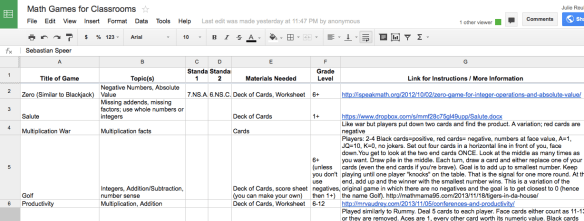
In a recent Middle School Math Chat  (#msMathChat, Mondays at 9PM EST), Adrienne, @shlagteach, suggested that we create a Google Doc compilation of games for math class.  Screen Shot 2013-11-14 at 8.44.51 AMSo, I created a Math Games for the Classroom Google Spreadsheet.  The spreadsheet lists the game, the concept or standard the game teaches, and the rules for each game.

Screen Shot 2013-11-18 at 12.18.05 PM

Please add a math game to the spreadsheet.  You can add an individual game, or if you know of a collection of games, you can add it to the “Collections” page.  Thanks so much to John Golden, @mathhombre, for adding the Collections page and several collections!

Games 1 It would be really helpful if you have blogged about your game, so that you can go into detail explaining it, and then include a link to your blog post in the Spreadsheet.  If you haven’t blogged about the game you want to add, this would be an excellent opportunity to do so!

Bill Carrera had an idea for a great activity using the spreadsheet. He had his students read the Math Games Google Spreadsheet and pick a game to learn and play.  He even had the students create their own games and teach it to someone else!

I would love to hear any other great ideas or what you are doing in your classroom with math games!

Why I Love To Blog

Kate’s question, “Why do you blog?” could not have come at a better time.  This Tuesday, I will be talking about social media with the math teacher education students in the Master Teacher Fellow program at at Wake Forest University.  I can’t wait to share all of the responses to Kate’s question with them!  I hope that all of your responses will encourage them to blog as they enter the wonderful world of teaching next fall!

1. What hooked you on reading the blogs? Was it a particular post or person? Was it an initiative by the nice MTBoS folks? A colleague in your building got you into it? Desperation?

After being out of teaching for almost 10 years, I heard about Dan’s blog from a speaker at NCCTM.  Reading his inspirational blog made me want to be a better teacher. I was hooked.  Reading Dan’s blog also led me to many other math teacher blogs.  I was amazed at all of the free resources that I found on every blog I read.  This type of sharing simply did not exist when I first entered teaching.  I was amazed at the generosity of the teacher bloggers. 

2. What keeps you coming back? What’s the biggest thing you get out of reading and/or commenting?

The quality of the resources I find on blogs keep me coming back.  The thing I love the most about blogs is that it isn’t just a lesson like you would find in a book or on a website, but there is a dialog.  Teachers not only share their lesson, but they tell you how tell you how they taught it, how it went, post examples of student work and even pictures, and even tell you how to improve it when you teach it.  This type of dialog is invaluable when you are considering teaching a new lesson for the first time.

3. If you write, why do you write? What’s the biggest thing you get out of it?

I love to write because I want to give back to this community.  I am so appreciative of all of the support I have found and want to share this with as many teachers as possible.  I also write so that I can remember specifically what I did in a lesson and can refer back to it.  I like writing about lessons I need help with.  The teachers that comment on my blog and help me make lessons better are so helpful to my teaching.  I am not a great writer, but I am comforted that mostly math teachers read my blog.  

4. If you chose to enter a room where I was going to talk about blogging for an hour (or however long you could stand it), what would you hope to be hearing from me? MTBoS cheerleading and/or tourism? How-to’s? Stories?

I would love to hear your story Kate.  I think that it would inspire others, as you and so many other bloggers have inspired me.  I could never thank this community enough for all that they have given to me.  They have changed my teaching and thus made my everyday work like so much more enjoyable.  THANK YOU ALL MTBoS!!