Google Docs for Project Questions = BRILLIANT!

I teach 6th graders.  I’ve learned that they struggle with following directions (written and verbal) and really good at asking millions of questions (you know, when they don’t listen or feel like reading the directions).

This SHOULDN’T drive me crazy, because I know it is a skill they are still learning.  I know that many of them have been spoon fed each and every step, one step at a time, in elementary school.  I know they are sometimes just too excited to listen to me, or read the directions.  But, they have to now.  Because otherwise I NEVER get to everyone’s questions.  And they just sit there, with their hand raised, waiting on me to help them, while they do nothing, but wait.  The result is usually that several students do not finish their daily project, and I get really frustrated answer almost the same question 50 times, an hour.  “Did you read step #3?”  “That is written in step #2.”  “You can find that answer in step #5 of your written directions.”   “Have you read the directions?”

Enter Google Documents.  God bless Google Document today.  Today I SAT, in one spot, in my comfy teacher chair, and answered questions.  In fact, I was able to answer over 50 detailed questions in just two 45 minute class periods.  Since this included introducing the project and a summary at the end even I can’t believe how many questions I answered (painlessly).  Everyone got so much work done.  Many students even finished in class.  The classroom was very quiet today while the students actually read and followed the directions.  It was teacher heaven!

Ok, I KNOW – enough already.  I will get to what I did.  I am just in awe and basking in it tonight!  This is the third year in a row I have done this project, and this is the first year is wasn’t pure torture for me.  In fact, it was a blast!

  1. I created the step by step project instructions, as usual, and made them available to the students. 
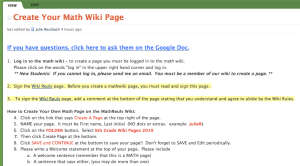
  2. I created a public Google Document and I retyped all of the project steps onto it.
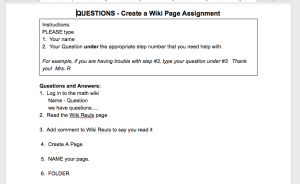
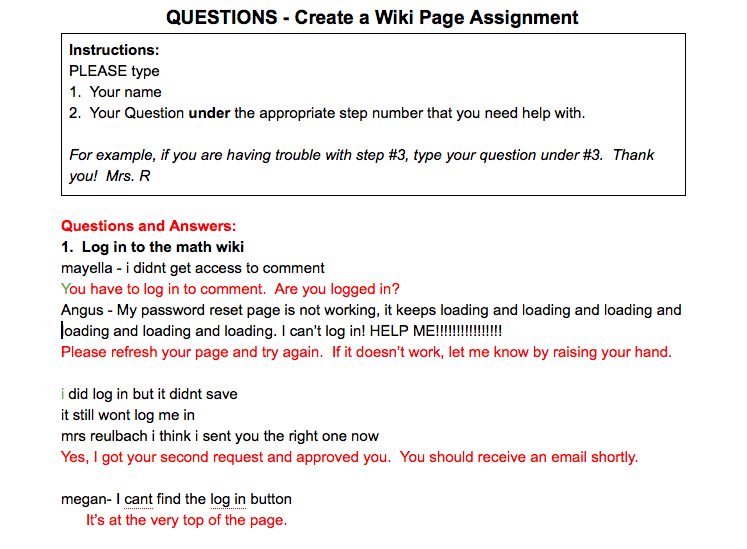
  3. I told the students how to use the question document.  The students were instructed to type their question under the step that they had a question on.  This was great because they really had to pay attention to which step they were on.  This often meant re-reading the question, and many students discovered the answers to their questions by simply re-reading the instructions.
  4. Every time I saw a hand go up in class I asked the student if they had already typed their question on the Google Doc.   I also asked them if they read the other questions that had been posted on that step.  Often, their question had been asked and answered by another student and was already on the document.

In the end, it looked like this…
MS Sunday Funday – iPad Apps and Other Technology in the Mathematics Classroom

 #msSunFun

Next week, please blog about how to increase students problem solving skills.

Technology in the Mathematics Classroom

Our middle school has been one to one for the past two years and I love it.  I mostly have the students work on Google Documents (Drive).  The best things about Google Documents are that it is free, updates instantly, allows students to collaborate, and there is no software required.  I occasionally use Khan Academy problem sets for students to practice their basic skills.  I like it because students can easily find the next topic to work on once they are proficient in one topic.  I don’t love that I can’t chose the level of problems they work on, some of the topics aren’t covered, and some of the question sets are too broad (or advanced) for my students.  Plus, even though I have directed them where to go next on Khan academy, students often jump to things like one step addition and subtraction just to gain points.  I have been using ThatQuiz.org lately too.  I really love all of the options that I can pick AND that I can create my own quizzes!  I have been using this for extra practice, and to see how my students are doing on their basic skills.  My big problem here is just finding the time to create more assessments.

Our 9th grade is piloting an iPad program this year.  I have an iPad, but I can’t say I love it.  Google Documents are almost impossible to use on an iPad.  I also can’t edit my wiki pages either.  I’ve heard there is a way around this, and I tried but didn’t find it.  Since GDocs and wiki’s are 90% of what I do for my classes, my iPad hasn’t been of much use to me this year.  It’s just a big old iPhone that isn’t even a phone!  So, I’m very excited to hear if there is something actually useful for that big old waste of money, and not just “cool” because it is an iPad.  If you don’t feel like writing a blog (or don’t write a blog), you can leave me a comment to tell me why you love iPad’s for your math classroom, OR even to help you out in your classroom if your students don’t have them.  But, we only have one iPad (mine) right now, so as much as I love Apple and my Mac, I’m just not on board with iPads for students right now.  The benefits would have to be very high to outweigh the costs, especially since all of our students have laptops.  So, what I am also wondering is, given the choice, would you rather your students have laptops or iPads?

Study Guide Kit for Math Tests

I teach 6th and 7th graders.  For most of them, 6th grade is the first time they have ever had to study for any test, much less a math test!  To help them along, I created two things for my students, a “How to Study for a Math Test” checklist and a “Math Test Study Guide” foldable.

  1. Laminate the checklist and then have them create a pocket in their graph notebook to keep it in (so they hopefully don’t lose it).
  2. Assign the study guide for homework a couple of days before the test (it becomes a foldable).
  3. Foldable – Have them fold the study guide and glue it into their notebook once they are completely finished filling it out.  They can decorate the cover if they like.
  4. Have in class and work time math help where we use their completed study guides.

This helps me help them!

This slideshow requires JavaScript.

For future tests I only have to print out the study guide.


Support Math Bloggers – MS Sunday Funday!

Click here to submit your MS Sunday Funday post!

This week was fabulous for me!  I enjoyed reading middle school math blogs so much that I read them ALL.  I wasn’t able to comment on them all because I often read them on my iPhone and it’s hard for me to type comments on that little thing.  PLUS, I can almost never prove that I am not a robot.  HEY BLOGSPOT – I AM NOT A ROBOT!  lol!

The best thing about this week was reading posts from the Middle School Math Blogs page that are not “popping up” in my Google Reader.  Why are they not popping up?  Because some of the blogs that I read haven’t posted since the summer (or even the spring).  I know how hectic teaching is (especially when you try to combine it with family life), but all of these blogs were fabulous and I am hopeful that these bloggers start posting again – even if it is only one great idea a month!  I love new ideas!

Some of my favorite things I read about this week are buzzers (which I have been eying since the spring but have not pulled the trigger), and the reminder about ThatQuiz.org.  I have used it before, but forgotten about it.  It will be great for integers and I even may try to incorporate it into standards based grading.  Wouldn’t it be great even if SOME of the reassessments were electronic?  I know there will be some significant front end work here, but anything is better than grading papers – anything!!  I also loved the Stand Up, Sit Down warm up activity that helps review fractions, decimals, percents.  You could use this just for fractions, then decimals when you get there, then add on percents.  Brilliant!  And, speaking of SBG, Fawn blows me away as usual with her printed SBG labels.  What an amazing time saver!

THANK YOU for reading and commenting on other blog posts as well!  There is nothing more important in our community than supporting each other.  In so many posts I read, bloggers mention other blogs that have helped them.  Everyone is so thankful for our “gift” community of freely sharing our resources.  It makes us all better teachers!

If you want to write about your favorites, please do and then submit your post here so I can include you below!  Also, if you have given “props” to another teachers blog on your blog recently, please submit that as well.  We all love to be recognized for taking the time to blog and sharing our “blood, sweat and tears” resources.  Click here to submit your MS Sunday Funday post!

NEXT WEEK we will blog about iPad apps and other technology sites that we use in our middle school mathematics classrooms.  Please join us!  🙂

Quick and Easy Math Stations (aka – Pimp Your Worksheet)

I LOVE Math Stations and wrote all about them before.  For easy stations, you can make fabulous math stations in a fraction of the time by simply cutting up a worksheet into 5 or 6 pieces.

Materials Needed:

  • 1 Math Worksheet
  • 1 Answer Key
  • 5/6 sheets of different colored paper
  • 1 Station Word Foldable**
    ** This is totally optional as students can simply do the work in their notebooks. 

First, I find a worksheet that has all of the topics I am interested in working on.  My “teacher edition math book” is of course FULL of these.  I print off the Station Templates onto colored paper and cut them in half.  (One half is to glue the questions on, one side is to glue the answers on.)   I cut the worksheet into 6 pieces and then glue stick them onto the Station Templates.  I glue stick the answers onto the matching colored “Answer” sheets and fold them in half.  I insert the Stations into clear picture frames for easy viewing (and sharing) and then tape the answers up in a central location.

Viola!  I have quick and easy, color coordinated Math Stations.  The students get tons of practice while moving around the room.  I can help students that need it.  The kids love them, I love them.  Everybody wins!  🙂

This slideshow requires JavaScript.

img_6175

Blog Comments CHALLENGE – Help Encourage Our Community!

This week you don’t even have to write a blog to participate in the MS Sunday Funday!  EVERYONE can participate this week!

EVERYONE is asked to please read FIVE blogs and comment on the blog post.  That is just one blog a day.  We are a community, and I would love to encourage and support each other.  It would be great if you could pick blogs that you aren’t familiar with so you can read about someone new.  Then, if you would like, you could even blog about your favorite new blogs next Sunday for MS Sunday Funday!  If you don’t have a blog, you can email me your comments.  I will compile them and post the compilation next week. 

Here are ALL of the MS Math blogs that I currently have https://ispeakmath.wordpress.com/middle-school-math-blogs/  I have also created a bundle for Google Reader, which you can subscribe to from this page.

Additionally, here are the NEW Math blogs from the Blogging Initiation (with the subject that they teach next to it in case you want to read a blog in your subject area).  https://ispeakmath.wordpress.com/2012/09/19/new-bloggers-from-the-math-blogger-initiation-sorted-by-division/

Happy Commenting! 

Math Club? MS Sunday Funday

So it seems that only dear Beth had a Math Club post for us this week.  Thank you Beth!  And now I do feel a little better (or worse?) that I am not the only one out there that is not sponsoring a math club.

Beth, Math Club Memories

Tweet Me Maybe!

I listened to this for the first time since the summer.  I love it.  It reminds me of Twitter Math Camp. It is what Twitter is all about.  I know tweeting seems daunting.  But really, you don’t have to send out tweets, you can just follow math teachers and get GREAT ideas.  So many math teachers are out there tweeting their blog posts and so many great ideas.  You don’t have to be alone!  Tweet Me Maybe!

Tweet Me Maybe Song!

Thanks so much Sean and Rachel for such an amazing song.  You are amazing math teachers and artists!

Homework Responsibility and Monster Equations

Yikes, it’s Saturday, not Friday.  I was so energized after a after a FABULOUS week of teaching and I couldn’t wait to blog.  I really meant to post last night,but I just didn’t have it in me!  So, here is my favorite Friday – on Saturday!

This week my “No Homework Responsibility Binder” blew me AWAY.  I have kids turning in late homework right and left.  Last year, when they didn’t do homework, they took their zero and moved on.  This year, they are doing it – even if it is a week later!  I believe that it is the format of the binder and the new incentive that I have offered for making up their missed homework.  I only check homework for completion.  At the end of the grading period, they have a homework completion grade that is equal to one test grade (50 points in my class).  Every time they do not have their homework, they lose 2 points.  It can add up (or rather, subtracts) pretty fast.  This year since I am not tracking missed homework (the binder does that for me) I am freed up to offer an incentive.  WHEN they make up their homework they get half credit back.  It’s working like a dream and almost every student has made up every homework assignment so far this year.  I’m in heaven.

I love my green, yellow, and red baskets (thanks @fouss) where students turn in EVERY paper and assessment!  They put their paper in the green basket when they felt they understood it well, the yellow basket is so-so, and the red basket is my “SOS – HELP ME I’m lost” basket.  If kids turn in a paper to the yellow basket but do very well, I always put a “Go Green”! on their paper.  I want them to be confident in their math abilities!

My other favorite this week is MONSTER EQUATIONS.  The kids can’t get enough of them.  I love their monsters!  When we moved to x/2 = 3 this week we got to draw HALF of a monster.  How much fun is that?  Then I got to say, “If HALF a monster can eat 3 people, how much could an ENTIRE MONSTER EAT.”   (** Note, I am also modeling this on the balance scale and then writing out the steps. **)  It really makes equation solving fun.  A student even made me three adorable monsters (with google eyes and everythign) and brought them to me Friday.  I meant to take a picture and post it, but forgot.  I will though – they are so cute!